

- Keys stay out of YAML. Agent and workflow definitions can be shared, versioned and committed to git without leaking secrets. Keys are stored securely and never returned in API responses.
- Models are swapped in one place. Point the config at a new deployment or model and every agent that uses it follows.
- Rate limits and costs are easier to reason about, because you know which agents share a model.
Supported providers
Each config also has a Model Type: LLM for chat models, or Embedding for models that turn text into vectors (used by knowledge bases).
Adding a model in the console
Go to LLM Repository → Add LLM: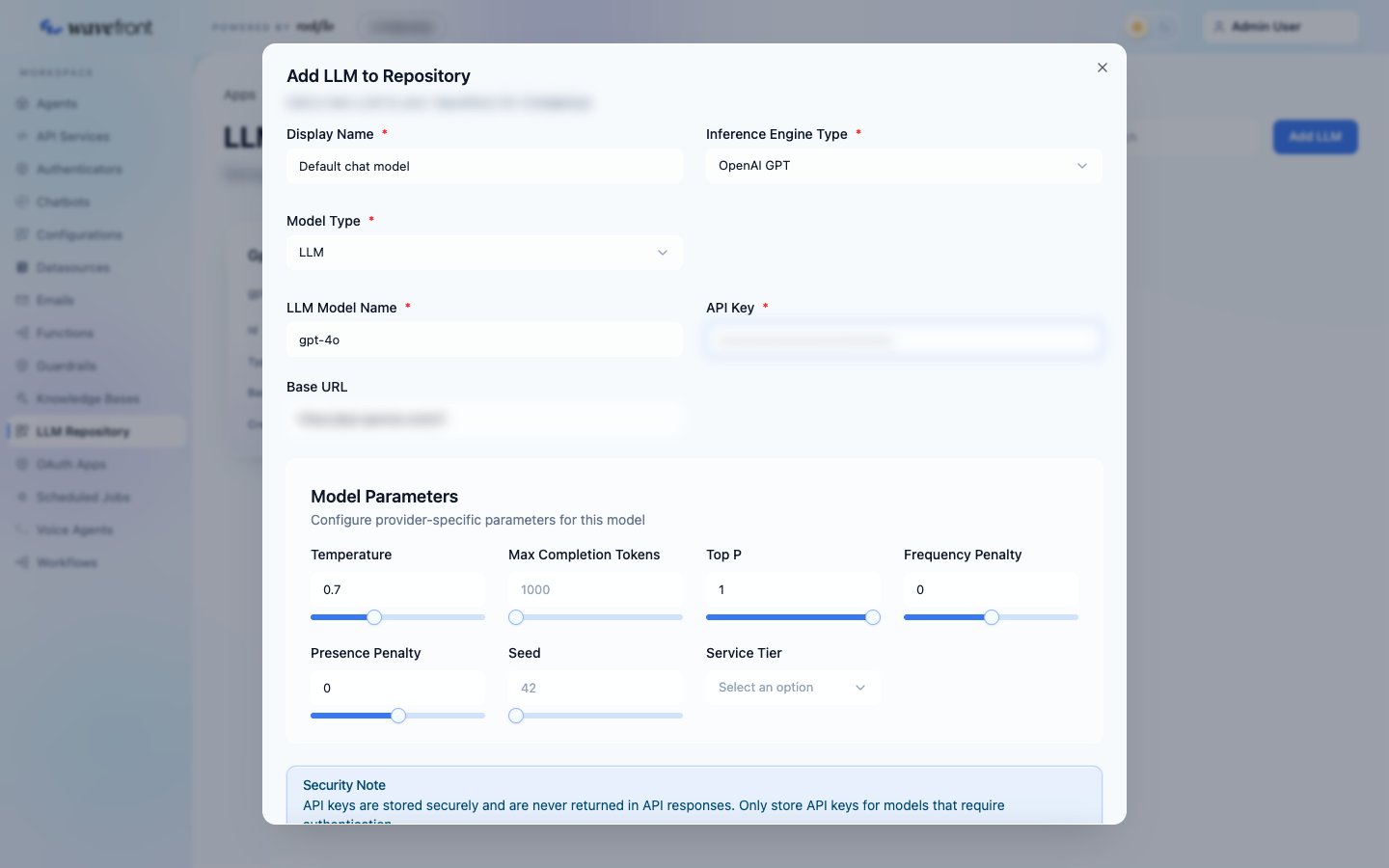
Using a model from an agent or workflow
In any agent definition, inline or saved, point themodel block at the config:
provider: rootflo means “use a model from this app’s LLM Repository”. The agent picks up the provider, model, key and base URL from the config at run time.
Model parameters on the agent (for example settings.temperature: 0) override the config’s defaults for that agent.
Trying another model without editing the agent
The agent’s chat panel in the console has a model picker under the conversation. Pick another config to test the same agent against a different model. Nothing is saved.Calling a model directly
An application sometimes needs a plain model call outside an agent. The app can proxy that call so the key stays on the server:<provider path> appended, using the config’s key. For an Azure OpenAI deployment, for example: